> ## Documentation Index
> Fetch the complete documentation index at: https://docs.0xarchive.io/llms.txt
> Use this file to discover all available pages before exploring further.
# Large taker orders
> Mark every bar where a single taker order filled for more than a size, joined from its fills.
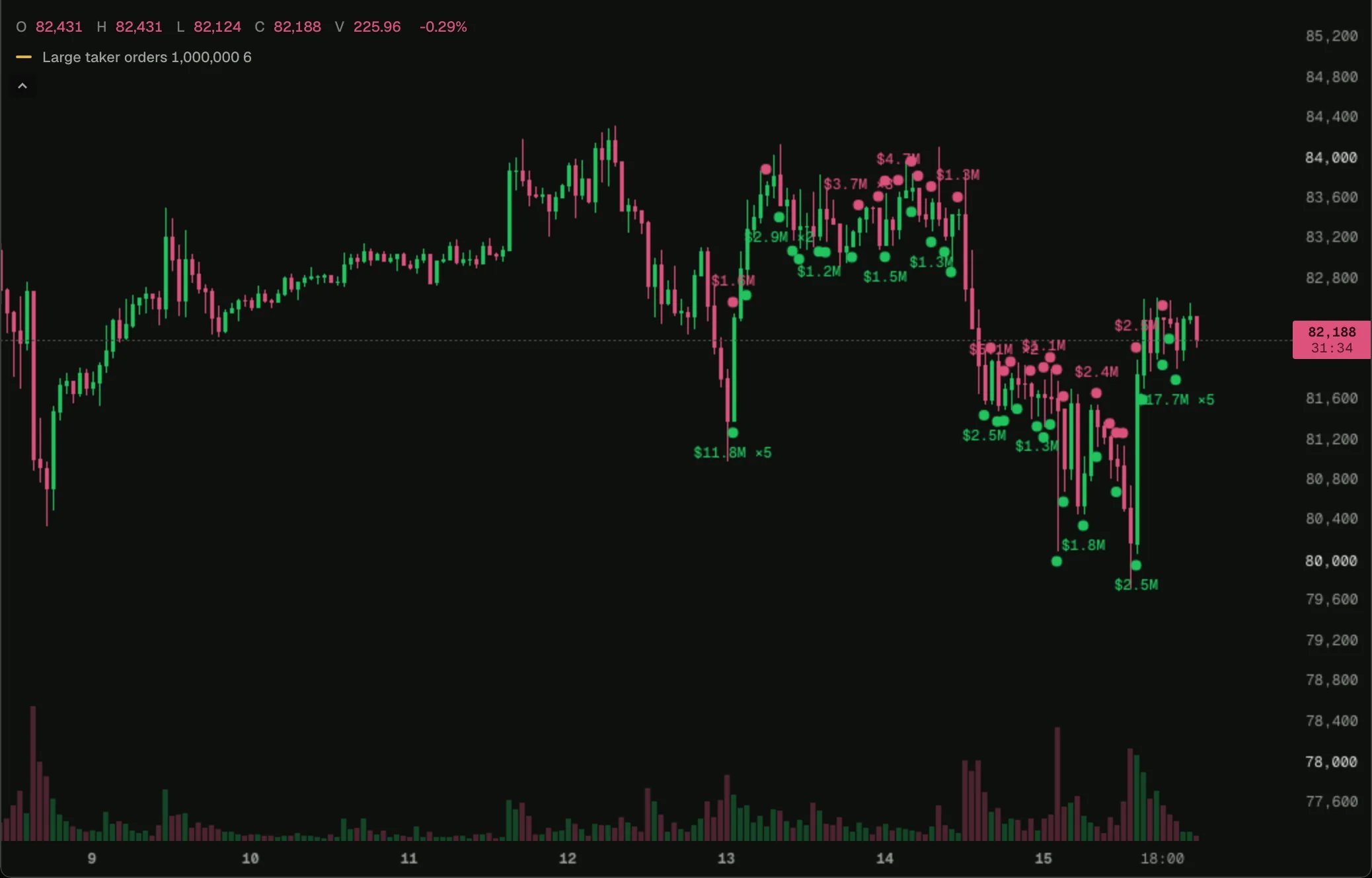 Load it on BTC 1h in the terminal, then change its settings or open it in the script editor.
A big market order fills against many resting orders, and each fill is a separate trade. This script joins the fills back into orders and marks bars where a taker order came to \$1M or more: buys under the candle, sells above, with the total and how many orders when there was more than one.
## How it works
Each trade says whether the same taker order filled the trade before it (`sameOrder`). A new order starts where it is false, so a counter in [live state](/terminal/guides/state#state) numbers the orders, and a [`tallyBy`](/terminal/guides/state#tallies) sums each order's USD within the bar. Labels closer than six bars to the last one keep their dot and drop their text, so they never print over each other.
## Try changing
* Change **Minimum order** for the market: \$1M is large on BTC and enormous on a small market.
## The script
```ts large-takers.ts theme={"theme":"github-dark"}
// Taker orders above a size, joined from their fills. One mark per bar and side: the orders' total, and how many when more than one.
indicator('Large taker orders', { overlay: true });
const minUsd = input.float('Minimum order ($)', 1_000_000, { min: 0 });
const gap = input.int('Bars between labels', 6, { min: 1, max: 200 });
const chart = bars();
const tape = trades();
const orders = tallyBy(512);
const marks = plot.markers('Large takers');
// The bar of each side's last label: a mark closer than `gap` bars keeps its dot and drops its text, so labels never print over each other.
const lastBuyLabel = state.bar(-gap);
const lastSellLabel = state.bar(-gap);
// The fills of one taker order come one after another, and each after the first says so: a new order starts where `sameOrder` is false.
const order = state.live(0);
tape.onTrade((t) => {
if (!t.sameOrder) order.value += 1;
orders.add(String(order.value), t.side === 'buy' ? t.notional : -t.notional);
});
chart.onClose(() => {
let buyUsd = 0;
let buys = 0;
let sellUsd = 0;
let sells = 0;
for (const [, usd] of orders.entries()) {
if (usd >= minUsd) { buyUsd += usd; buys += 1; }
if (-usd >= minUsd) { sellUsd -= usd; sells += 1; }
}
if (buys > 0) {
const labelled = chart.index - lastBuyLabel.value >= gap;
if (labelled) lastBuyLabel.value = chart.index;
const text = buys > 1 ? `${fmt.usd(buyUsd)} ×${buys}` : fmt.usd(buyUsd);
marks.add({ position: 'below', shape: 'circle', text: labelled ? text : '', color: color.up });
}
if (sells > 0) {
const labelled = chart.index - lastSellLabel.value >= gap;
if (labelled) lastSellLabel.value = chart.index;
const text = sells > 1 ? `${fmt.usd(sellUsd)} ×${sells}` : fmt.usd(sellUsd);
marks.add({ position: 'above', shape: 'circle', text: labelled ? text : '', color: color.down });
}
});
```
## Next step
See the next example, [Liquidations](/terminal/examples/liquidations).
This documentation is built and hosted on [Mintlify](https://mintlify.com), a developer documentation platform.
Load it on BTC 1h in the terminal, then change its settings or open it in the script editor.
A big market order fills against many resting orders, and each fill is a separate trade. This script joins the fills back into orders and marks bars where a taker order came to \$1M or more: buys under the candle, sells above, with the total and how many orders when there was more than one.
## How it works
Each trade says whether the same taker order filled the trade before it (`sameOrder`). A new order starts where it is false, so a counter in [live state](/terminal/guides/state#state) numbers the orders, and a [`tallyBy`](/terminal/guides/state#tallies) sums each order's USD within the bar. Labels closer than six bars to the last one keep their dot and drop their text, so they never print over each other.
## Try changing
* Change **Minimum order** for the market: \$1M is large on BTC and enormous on a small market.
## The script
```ts large-takers.ts theme={"theme":"github-dark"}
// Taker orders above a size, joined from their fills. One mark per bar and side: the orders' total, and how many when more than one.
indicator('Large taker orders', { overlay: true });
const minUsd = input.float('Minimum order ($)', 1_000_000, { min: 0 });
const gap = input.int('Bars between labels', 6, { min: 1, max: 200 });
const chart = bars();
const tape = trades();
const orders = tallyBy(512);
const marks = plot.markers('Large takers');
// The bar of each side's last label: a mark closer than `gap` bars keeps its dot and drops its text, so labels never print over each other.
const lastBuyLabel = state.bar(-gap);
const lastSellLabel = state.bar(-gap);
// The fills of one taker order come one after another, and each after the first says so: a new order starts where `sameOrder` is false.
const order = state.live(0);
tape.onTrade((t) => {
if (!t.sameOrder) order.value += 1;
orders.add(String(order.value), t.side === 'buy' ? t.notional : -t.notional);
});
chart.onClose(() => {
let buyUsd = 0;
let buys = 0;
let sellUsd = 0;
let sells = 0;
for (const [, usd] of orders.entries()) {
if (usd >= minUsd) { buyUsd += usd; buys += 1; }
if (-usd >= minUsd) { sellUsd -= usd; sells += 1; }
}
if (buys > 0) {
const labelled = chart.index - lastBuyLabel.value >= gap;
if (labelled) lastBuyLabel.value = chart.index;
const text = buys > 1 ? `${fmt.usd(buyUsd)} ×${buys}` : fmt.usd(buyUsd);
marks.add({ position: 'below', shape: 'circle', text: labelled ? text : '', color: color.up });
}
if (sells > 0) {
const labelled = chart.index - lastSellLabel.value >= gap;
if (labelled) lastSellLabel.value = chart.index;
const text = sells > 1 ? `${fmt.usd(sellUsd)} ×${sells}` : fmt.usd(sellUsd);
marks.add({ position: 'above', shape: 'circle', text: labelled ? text : '', color: color.down });
}
});
```
## Next step
See the next example, [Liquidations](/terminal/examples/liquidations).
This documentation is built and hosted on [Mintlify](https://mintlify.com), a developer documentation platform.